Xbox controller overlay for OBS
An Xbox controller in the corner of your stream that mirrors every input, in stock black or a camo from the vault. One link in OBS.
Design my Xbox overlay
Press any button on your Xbox controller
Try a skin
Stock is free. Camo skins are in the vault, $9.99 once.
What the Xbox controller overlay shows
The Xbox controller overlay puts a live Xbox pad on your stream. A, B, X and Y light up when you press them, and the D-pad shows each direction you hit. LB and RB light on the shoulders and LT and RT behind them, so a viewer can tell an aim-down-sights from a hip fire at a glance.
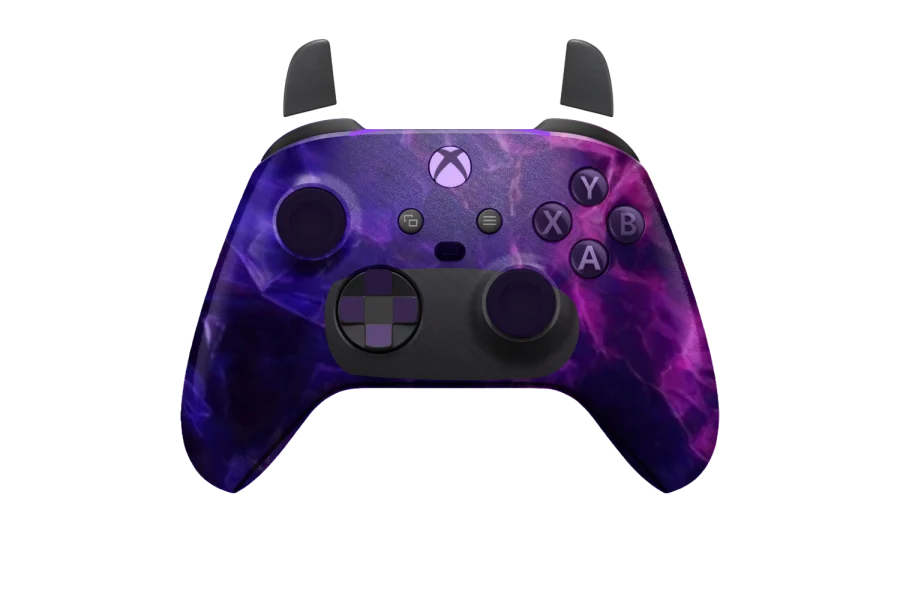
The sticks keep the Xbox layout: the left stick sits high, above the D-pad, and the right stick sits low, under the face buttons. Both move on the overlay as you move them. The View and Menu buttons in the middle of the pad light up when pressed as well, so a pause or a map check is visible on stream.
Using the Xbox overlay rather than a PlayStation one matters to viewers who play on the same pad. They see letters instead of symbols, LB and RB instead of L1 and R1, and the sticks where their own thumbs rest. When someone in chat asks what you pressed, the answer on screen uses the names printed on their controller.
The light on the Xbox overlay runs along the rim at the top of the pad and follows the light colour you set. The rest of the page is transparent: only the controller is drawn over your game.
Add the Xbox controller overlay to OBS
In OBS the Xbox controller overlay is a single Browser Source:
- Sign in, select the Xbox pad, pick a skin and copy your overlay link.
- Add a Browser Source to your scene in OBS.
- Paste the link into the URL field and set the width to 800 and the height to 600.
- Move it clear of your HUD and press a button on your Xbox controller.
The overlay reads the pad inside the browser source, so the Xbox controller must be connected to the computer that runs OBS. Resize the source to suit your scene. The link stays the same for good: change the skin or colours on the site and the overlay in OBS updates within about 12 seconds.

Streamlabs and TikTok LIVE Studio
The same link works wherever there is a browser source. In Streamlabs or TikTok LIVE Studio, add one, paste the link and set 800 × 600, then scale it inside the scene as you would in OBS Studio.
A link runs on one stream at a time. If it opens somewhere else, the earlier copy stops; refresh the browser source where you are streaming and it takes the link back.
Connecting an Xbox controller
Connect the controller to your computer with a USB cable, or pair it over Bluetooth if your pad supports it. The site reads it through the browser Gamepad API. Until a controller sends its first button press, browsers keep it hidden from web pages, so press a button after the page opens and the overlay picks it up.
A cable is the quickest way to start: plug it in and press a button. Bluetooth removes the cable but adds a pairing step in your computer settings. You pair the controller with the computer, not with this website, and once paired it shows up the same way.
If a press ever lights the wrong part of the overlay, the pad is reporting its buttons in an order the browser does not expect. The calibrator fixes that for any controller. It asks for ten presses one after another, the four face buttons, LB and RB, then the four D-pad directions, and from then on each input lands on the right part of the pad. It is included with the free account.
Xbox controller overlay skins
The free stock look is a plain Xbox controller, which suits you if you want the overlay to match the pad on your desk. The vault skins are fitted to the Xbox shape too: Dark Matter, Orion, Borealis, Damascus and Abyss camos, the Crimson carbon, Phantom Wuxia and Vice Neon.
Use the list beside the pad at the top of this page to switch between them while the demo plays. Pressing a button on your own Xbox controller stops the demo and hands the pad to you, so you see each skin with your own inputs.
Button colours, lights and your name
Set one colour for A, B, X, Y and the D-pad; the skin underneath stays as it is. Set another for the light along the top rim and choose steady, pulse or off.
When you press a button, its shades swap, so the press stands out from the resting colour and from the camo behind it. Pulse lets the rim light breathe in and out; off leaves the skin as the only colour on the pad.
You can also print your channel name or handle on the pad, up to 16 characters. Everything is chosen from controls on the page, with no CSS to write.
Free or vault
A free account covers the stock Xbox look, your permanent OBS link and the calibrator. That is a complete Xbox controller overlay for OBS.
You can try every skin before you sign in. The pad at the top of this page switches between stock and vault looks and reacts to your own Xbox controller, with nothing to install.
The vault is a one-time $9.99, not a subscription. It opens every camo skin on the Xbox, PS5 and PS4 pads and the button, light and name colours. You need to sign in to save a design, copy your link or use a vault skin. The pricing page lists what is in each.
Buying the vault does not tie you to the Xbox pad. If you move to a DualSense or a DualShock 4 later, the skins you paid for are already there on those pads too.
PlayStation controllers
Streaming with a Sony pad instead? The PS5 controller overlay draws the DualSense, and the PS4 controller overlay draws the DualShock 4. Both have a touchpad on the overlay, and the vault skins you pick here carry across to them.